Dynamic QR codes
Dynamic QR codes let you change where a QR code goes after you've printed it, and see how many people scan it.
Print a code on a menu, flyer, or package today. If the link changes next month, update it in your dashboard and the same printed code takes people to the new page.
Manage your codes at qr.quickchart.io. Dynamic QR codes are included with every paid QuickChart plan. Developers can also manage them through the API.
Try the demo to see how it works.
Static vs. dynamic QR codes
Static (quickchart.io/qr) | Dynamic (qr.quickchart.io) | |
|---|---|---|
| Encoded content | Your text or URL, directly | A permanent scan link (/r/CODE_ID) |
| Change destination later | No, you have to reprint | Yes, updates apply on the next scan |
| Pause or disable | No | Yes |
| Built-in scan analytics | No (use UTM parameters) | Yes |
| Content types | Any (URL, WiFi, vCard, SMS, ...) | HTTP/HTTPS URLs |
| Account required | No | Yes (QuickChart API key) |
Static codes are still the right choice for WiFi, vCard, and other non-URL payloads, and for URLs that will never change.
Dashboard
Sign in at qr.quickchart.io using the email address on your QuickChart subscription. We'll email you a single-use sign-in link.
From the dashboard you can:
- Create a code, preview it, and download it as PNG or SVG
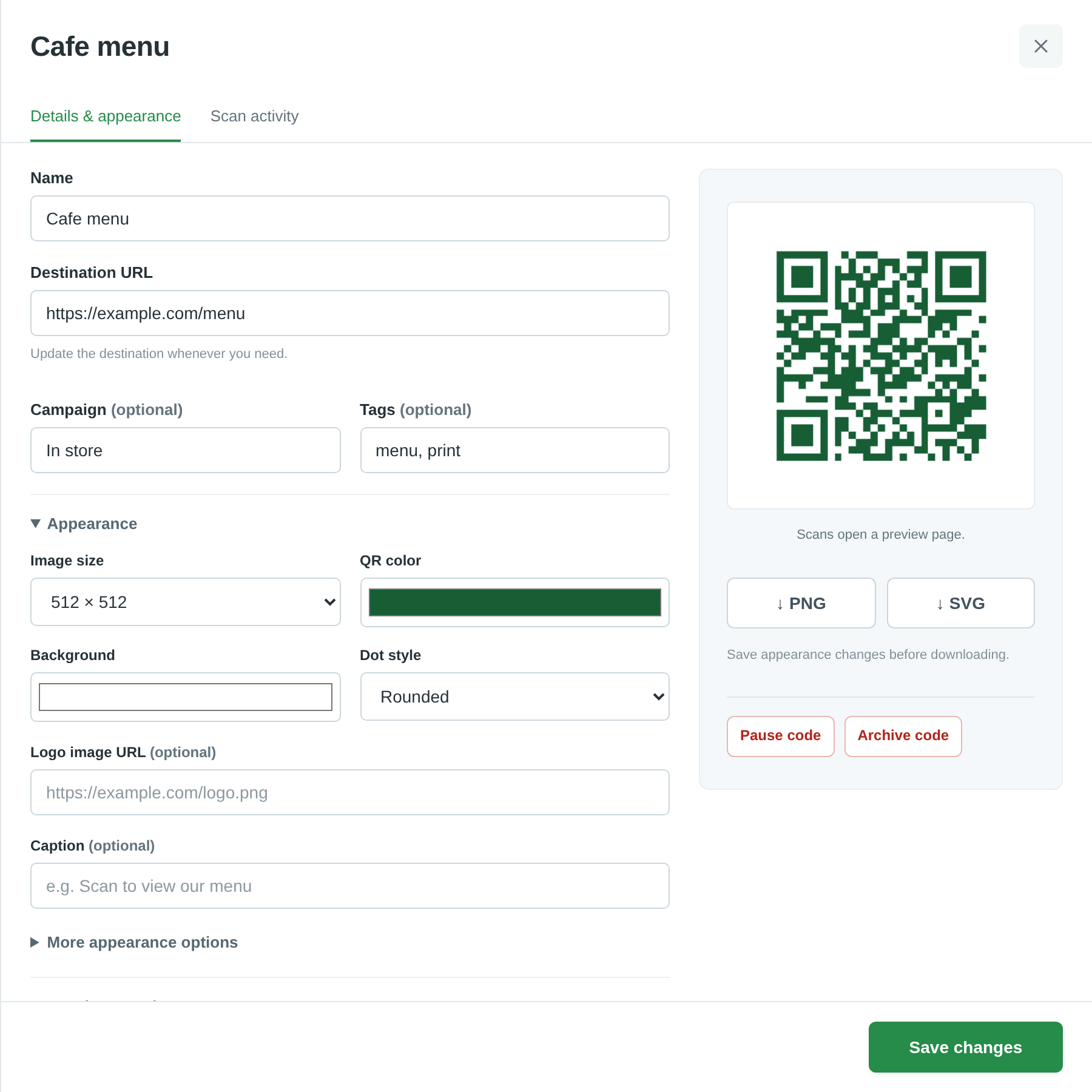
- Edit the destination, name, campaign, tags, and appearance
- Pause, resume, archive, restore, or delete a code
- Search and filter by status, campaign, or tag
- Bulk create codes from a CSV file or a list of URLs, then download them as a ZIP
- View scan analytics and export them as CSV
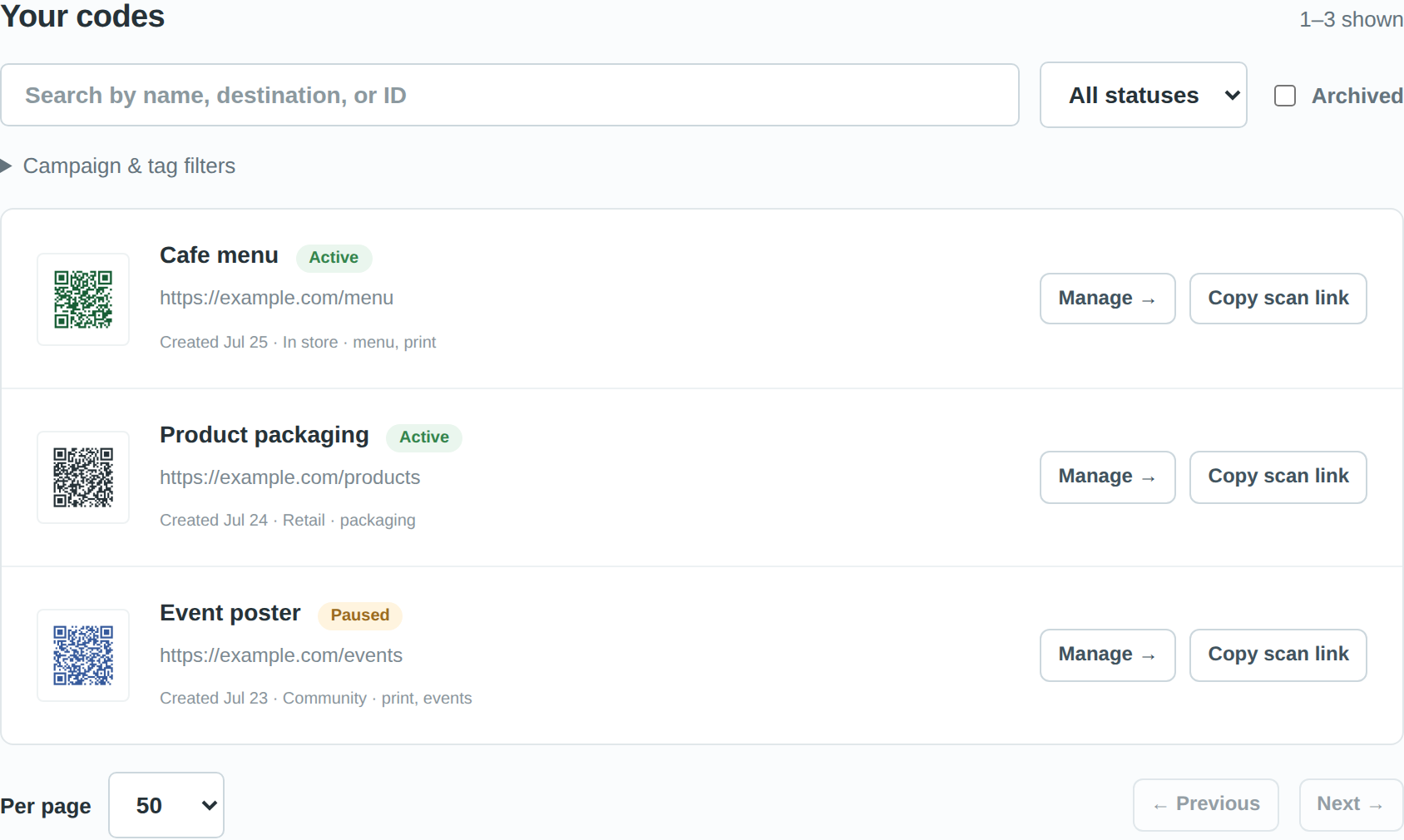
To change where a code goes, choose Manage, enter a new destination URL, and save. The printed code keeps working and sends people to the new page from the next scan.
API
Every API request authenticates with your existing QuickChart API key in the Authorization header. Keep the key on your server. Never put it in client-side JavaScript or in URLs.
Authorization: Bearer YOUR_API_KEY
The base URL is https://qr.quickchart.io/api.
Create a code
curl https://qr.quickchart.io/api/codes \
  -H "Authorization: Bearer $QUICKCHART_API_KEY" \
  -H 'Content-Type: application/json' \
  -d '{
    "name": "Summer menu",
    "targetUrl": "https://example.com/menu",
    "campaign": "Summer 2026",
    "tags": ["menu", "in-store"],
    "externalId": "menu-2026",
    "appearance": {"size": 512, "dark": "175e35", "light": "ffffff"}
  }'
| Field | Required | Description |
|---|---|---|
targetUrl | Yes | A public HTTP or HTTPS URL, at most 4,096 characters after URL encoding |
name | No | Display name, up to 150 characters |
campaign | No | Campaign label, up to 100 characters |
tags | No | Up to 25 tags, each up to 50 characters |
externalId | No | Your own identifier, up to 200 characters. Must be unique in your account, including deleted codes |
appearance | No | Saved image options. See Appearance |
A successful request returns HTTP 201:
{
  "success": true,
  "code": {
    "id": "CODE_ID",
    "name": "Summer menu",
    "targetUrl": "https://example.com/menu",
    "status": "active",
    "archived": false,
    "campaign": "Summer 2026",
    "tags": ["in-store", "menu"],
    "externalId": "menu-2026",
    "appearance": { "dark": "175e35", "light": "ffffff", "size": 512 },
    "scanUrl": "https://qr.quickchart.io/r/CODE_ID",
    "imageUrl": "https://quickchart.io/qr?size=512&dark=175e35&light=ffffff&text=https%3A%2F%2Fqr.quickchart.io%2Fr%2FCODE_ID&format=png",
    "createdAt": 1790000000000,
    "updatedAt": 1790000000000,
    "version": 1
  }
}
Print the image from imageUrl, or any QR code that encodes scanUrl. A QR code that links directly to the destination is a static code and cannot be updated.
If a create request times out, search for its externalId before you retry so that you don't create a duplicate.
Manage codes
| Method | Endpoint | Purpose |
|---|---|---|
GET | /api/codes | List your codes |
POST | /api/codes | Create a code |
GET | /api/codes/:id | Read a code |
PATCH | /api/codes/:id | Update destination, name, appearance, tags, campaign, or external ID |
GET | /api/codes/:id/image?format=svg | Download the image as PNG (default) or SVG |
POST | /api/codes/:id/pause | Stop redirects temporarily |
POST | /api/codes/:id/activate | Resume redirects |
POST | /api/codes/:id/archive | Hide from the main list and keep redirects working |
POST | /api/codes/:id/restore | Restore an archived code to the main list |
DELETE | /api/codes/:id | Permanently disable a code. This cannot be undone |
To change where a code points:
curl -X PATCH https://qr.quickchart.io/api/codes/CODE_ID \
  -H "Authorization: Bearer $QUICKCHART_API_KEY" \
  -H 'Content-Type: application/json' \
  -d '{"targetUrl":"https://example.com/new-menu"}'
Updates apply to the next scan. Redirect responses are never cached.
Status behavior:
- Paused codes stop redirecting and show a "paused" page until you resume them.
- Archived codes are hidden from the main list, but their redirects keep working. Restoring an archived code does not resume it if it is also paused.
- Deleted codes stop working permanently.
Codes do not expire when a subscription ends. A code stops redirecting only when it is paused or deleted, or when it is taken down for abuse.
List and search
GET /api/codes supports these query parameters:
| Parameter | Description |
|---|---|
q | Matches the name, destination, external ID, or code ID |
status | active or paused |
campaign | Filter by campaign |
tag | Filter by tag |
archived | true to list archived codes |
limit | 1–100 (default 25) |
cursor | The nextCursor value from the previous page |
When nextCursor is null, you've reached the last page.
Appearance
Images are rendered by the QuickChart QR code API. The appearance object stores these renderer options:
size(100–3000 pixels),margin(0–20)dark,light,ecLevelcenterImageUrl,centerImageSizeRatio(0–0.4),centerImageWidth,centerImageHeightcaption,captionFontFamily,captionFontSize,captionFontColordotStyle,finderStyle,finderDotStyle,finderColor
See QR code parameters and styled QR codes for what each option does.
PNG and SVG downloads use the same saved options. Codes with a logo (centerImageUrl) must be downloaded as PNG, because the renderer can't embed logos in SVG. When you send appearance in a PATCH, it replaces all saved options. Changing only the destination leaves the appearance as it is.
Scan-test your codes before printing them.
Bulk creation
In the dashboard, choose Bulk create to upload a CSV or paste a list of URLs. A single import can create up to 10,000 codes from a CSV of up to 2 MB. The CSV columns are:
| Column | Required | Notes |
|---|---|---|
targetUrl | Yes | |
name | No | |
externalId | No | |
campaign | No | |
tags | No | Separate tags with commas and quote the cell |
You can set a shared appearance, campaign, and tags for the whole import. The dashboard validates every row before it creates anything. Keep the page open while the import runs. If the import is interrupted, you can resume it from the same browser. When it finishes, you can download the images as a ZIP and a CSV that maps each source row to its code ID, scan link, and image URL.
Batch API
POST /api/codes/batch creates between 1 and 100 codes per request, up to 256 KiB of JSON:
curl https://qr.quickchart.io/api/codes/batch \
  -H "Authorization: Bearer $QUICKCHART_API_KEY" \
  -H 'Content-Type: application/json' \
  -d '{
    "batchId": "catalog-2026:0",
    "codes": [
      {"targetUrl":"https://example.com/one","externalId":"sku-1","name":"One"},
      {"targetUrl":"https://example.com/two","externalId":"sku-2","name":"Two"}
    ]
  }'
Each code accepts the same fields as single creation. A batch is atomic: either every code in it is created, or none are. On success, the API returns HTTP 201 with {"success":true,"batchId":"...","replayed":false,"codes":[...]}, listing codes in the order you sent them.
Give each batch a unique batchId (1–100 letters, numbers, underscores, colons, or hyphens). This makes batch requests safe to retry:
- Retrying with the same
batchIdand the same payload returns HTTP 200 with the original results and"replayed": true. No new codes are created. - Reusing a
batchIdwith a different payload returns HTTP 409. - A retry never restores a code that was deleted after the batch was created.
To check rows without creating anything, send {"codes":[...]} to POST /api/codes/batch/validate. Invalid rows return HTTP 422, and external ID conflicts return HTTP 409. Both include an errors array such as [{"row":2,"error":"..."}], where row numbers start at 1 within the request. Validation does not reserve external IDs or account capacity.
Download images as a ZIP
curl https://qr.quickchart.io/api/codes/download \
  -H "Authorization: Bearer $QUICKCHART_API_KEY" \
  -H 'Content-Type: application/json' \
  -d '{"ids":["CODE_ID_1","CODE_ID_2"],"format":"png"}' \
  -o qr-codes.zip
The ZIP contains one CODE_ID.png or CODE_ID.svg file per code. Each image encodes the code's scan link and uses its current saved appearance. A single request can include up to 1,000 codes and at most 450 million output pixels in total. Split larger downloads into several requests. Each image counts toward your account's rendering usage.
Scan analytics
Open a code and choose Scan activity to see its scans over time and where they came from. The dashboard also shows totals for your whole account.
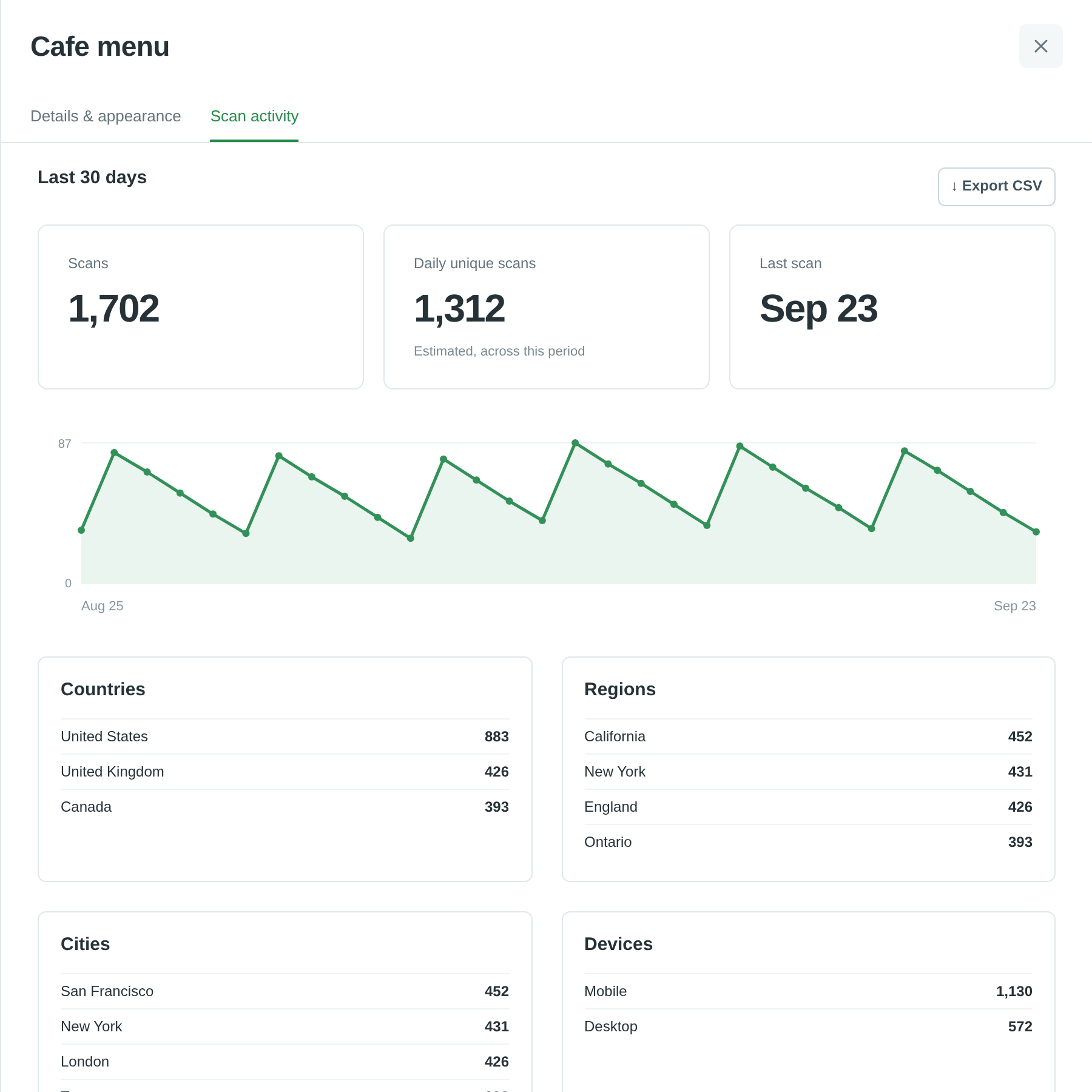
To get the same data from the API:
curl 'https://qr.quickchart.io/api/analytics?days=30&codeId=CODE_ID' \
  -H "Authorization: Bearer $QUICKCHART_API_KEY"
| Parameter | Description |
|---|---|
days | 1, 7 (default), 30, or 60 |
codeId | Limit results to one code. Omit it for account totals |
campaign | Filter by campaign |
tag | Filter by tag |
includeBots | true to include scans from known bots |
format | csv to export as CSV |
Results include total scans, daily unique scans, scans per UTC day, the time of the last scan, and top codes. They also break scans down by country, region, city, device, browser, operating system, referrer, and destination host. For windows of 30 days or less, results include a comparison with the previous period.
How scans are counted:
- A scan is a visit to the redirect link. Opening the link directly also counts. Generating or downloading an image does not.
- Known bots are excluded by default, but bot detection is imperfect.
- Counts may be sampled and can be delayed. Total scans are adjusted for sampling.
- Daily unique scans count the devices seen for each code on each UTC day. They don't count distinct people across codes or days. When
summary.sampledistrue, daily uniques include only the devices in the sample and may undercount. - Campaign and tag filters use the labels a code had when it was scanned.
- Location is approximate. No tracking cookies or raw IP addresses are stored. Referrers are reduced to hostnames, and query strings are removed from destinations.
Limits
- Up to 10,000 codes on the Professional plan. Paused and archived codes count toward the limit. Deleted codes do not. Contact us if you need more.
- Destinations must be public HTTP or HTTPS URLs. Private addresses, embedded credentials, and other
qr.quickchart.iolinks are rejected. - Analytics history goes back 60 days.
Errors
Errors return JSON in the form {"success":false,"error":"..."}.
| Status | Meaning |
|---|---|
| 400 | Invalid input |
| 401 | Missing or invalid authentication |
| 403 | Access denied |
| 404 | Code not found |
| 409 | External ID conflict, batch ID conflict, or code limit reached |
| 413 | Request too large |
| 422 | Batch contains invalid rows |
| 503 | A dependency is temporarily unavailable. Retry with backoff |
Need help?
See the full API reference or contact support.